

Deploy a Production-Ready AWS VPC Using Open-Source Terraform Repository

Learn how to deploy a highly available AWS VPC using a reusable Terraform module built with production-ready AWS best practices.
Introduction
Managing AWS infrastructure becomes much easier when your Terraform code is organized into reusable modules instead of writing everything from scratch for every project.
To help the community, I've created a public Terraform AWS Infrastructure repository that contains production-ready Terraform modules following AWS best practices.
The first module available in the repository is a Highly Available AWS VPC Module.
In this guide, I'll show you how to clone the repository and deploy the VPC in just a few steps.
What Does the VPC Module Create?
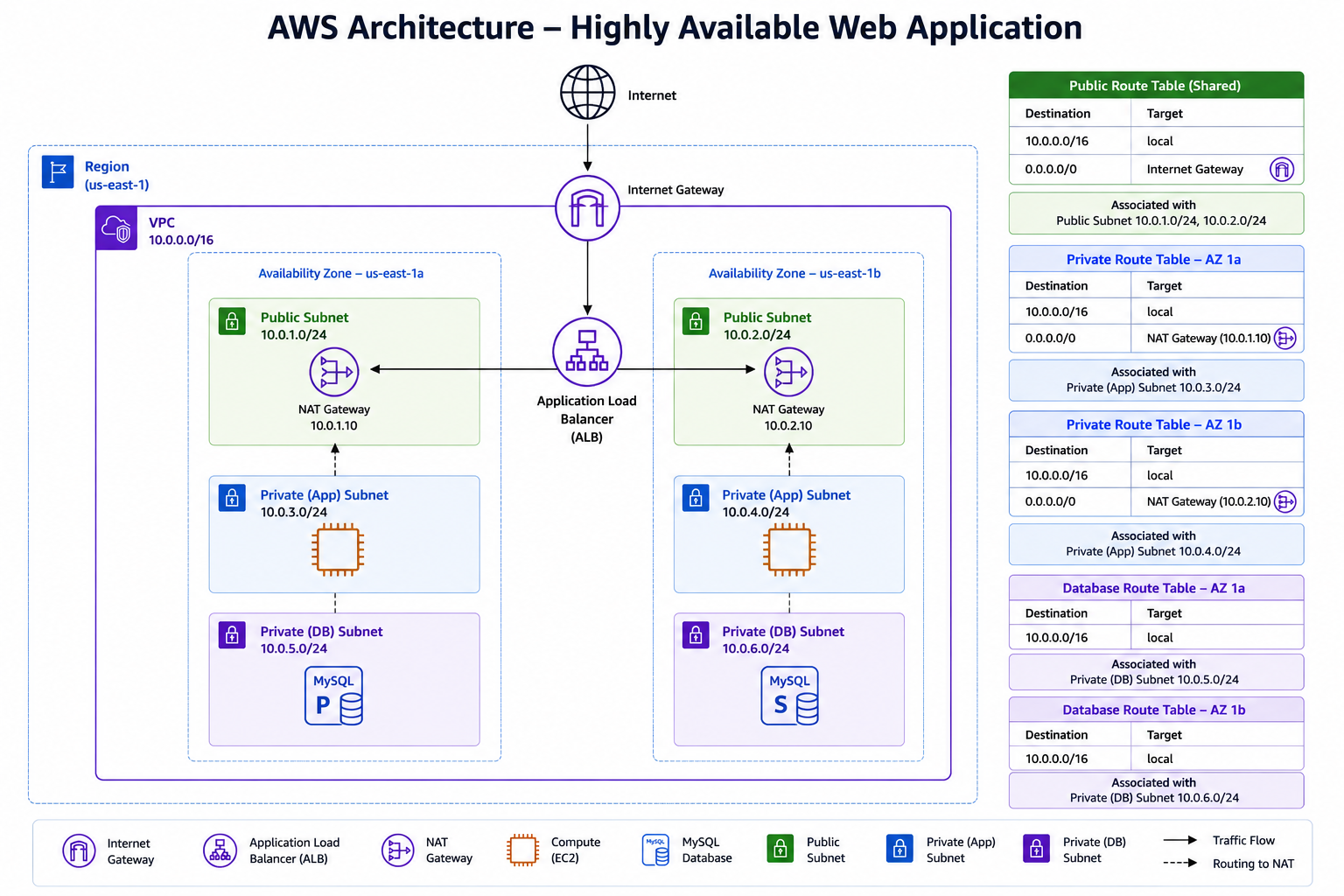
The VPC module provisions a highly available networking foundation, including:
Amazon VPC
2 Public Subnets
2 Private Application Subnets
2 Database Subnets
1 Internet Gateway
2 NAT Gateways (One per Availability Zone)
Shared Public Route Table
Dedicated Private Route Tables
Dedicated Database Route Tables
Prerequisites
Before deploying the infrastructure, ensure you have:
Terraform installed
AWS CLI installed
AWS credentials configured
Appropriate IAM permissions
Verify your AWS account:
aws sts get-caller-identity
Deployment
Step 1 — Clone the Repository
clone the repository
git clone https://github.com/MithrugandevOps/terraform-aws-infrastructure.git
cd terraform-aws-infrastructure
Step 2 — Navigate to the Production VPC Environment
cd environments/production/vpc
This directory already contains everything required to deploy the VPC.
Step 3 — Configure Your AWS Region (Optional)
If required, update the AWS provider configuration.
provider "aws" {
  region = "ap-south-1"
}
Step 4 — Update Variables (Optional)
Modify the CIDR blocks, Availability Zones, or naming conventions according to your environment.
Example:
vpc_cidr = "10.0.0.0/16"
Note
The repository already contains production-ready defaults that you can customize according to your environment.
Step 5 — Initialize Terraform
Initialize the working directory.
terraform init
Terraform will:
Download the AWS Provider
Initialize the working directory
Step 6 — Review the Execution Plan
Always review the execution plan before deploying infrastructure.
terraform plan
Step 7 — Deploy the Infrastructure
Deploy the VPC.
terraform apply
When prompted, type: yes
Terraform will provision all networking resources.
Verify the Deployment
After deployment completes successfully, verify the resources in the AWS Console
Future Modules
This repository will continue to evolve with additional production-ready AWS modules.
The goal is to build a collection of reusable Terraform modules that anyone can use in their AWS environments.
GitHub Repository
🔗 Repository
https://github.com/MithrugandevOps/terraform-aws-infrastructure
If you find this project useful, consider giving it a ⭐ on GitHub.
Happy Terraforming! 🚀
